Observe, Don’t Ask. Show, Don’t Tell. Part 4

Day 278 of Self Quarantine      Covid 19 Deaths in U.S.:  301,000   GA Vote!!

When I first encounter a new environment to observe and I am able to observe with “beginner mind” one of the challenges is to understand where to focus my attention?  Many environments are a “target rich” landscape of opportunities to improve the process.  The Orient phase is about understanding how to prioritize where to place your attention and focus and then to determine where to begin your potential improvements.

Since my professional background has a heavy dose of technology, I always have to resist the pull of Technology Centered Design.  Most technologists leap frog the Observe and Orient phases to jump right into providing a technological solution to some random part of the customer’s work process.  The Orient phase aims to make sense of what you have observed and then prioritize where to focus your prototyping efforts.  Each of the frameworks in the Orient phase provide a way to quickly triangulate where to start.

This blog post takes a look at a couple of specific examples in different stages of orientation to see how to apply the frameworks.

Brandon Fleming is the CEO of an early stage biotech startup doing chimerism tests for patients who had bone marrow transplants.  The test is moving from a research phase to an MVP phase.  Where manual processes were OK for research they will be too expensive for a V1 product.  So Brandon is now analyzing the video ethnography of the OBSERVE phase to the ORIENT phase to figure out where to start software prototyping.

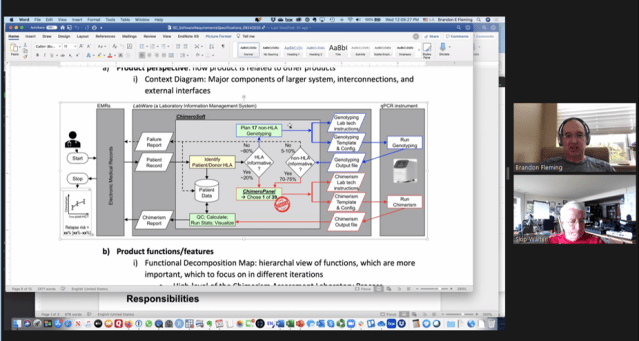
Using the video ethnography, he created the flow of work from the time the test is ordered until the time that the result is sent back to the oncologist.  Brandon asked “so these are the steps that we’ve identified in the process.  Is there a framework or process to help guide me to where I should start the prototypes for software product development?”
Brandon had read through the first three “Observe, Don’t Ask” blog posts.  He shared “There is a lot to absorb in that third post.  I know I need to understand it, but it seems overwhelming.”

We both chuckled and realized that we had our topic to explore for our weekly mentoring session over Zoom.

“I think we are going to focus on the where are the costs thinking from the diagram from eDiscovery, but let’s look at the first couple of frameworks.”

We looked at the workflow and realized that almost every step was a hassle and involved the lab tech following a printed step by step process with a lot of retyping from one system to another system.  These manual translation steps were tedious and potentially prone to errors.  So lots of hassles.  We might have stopped here to re-draw the hasslemap, but we kept going.

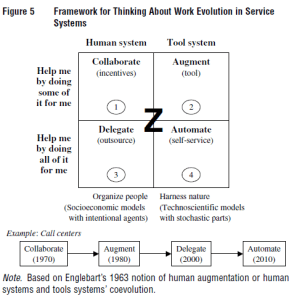
We looked at the SD Logic Augment sequence and realized that we were moving from the manual (collaborate) to the augment step.  We agreed that we were too early in our understanding to examine outsourcing (delegate) or full automation (self-service).
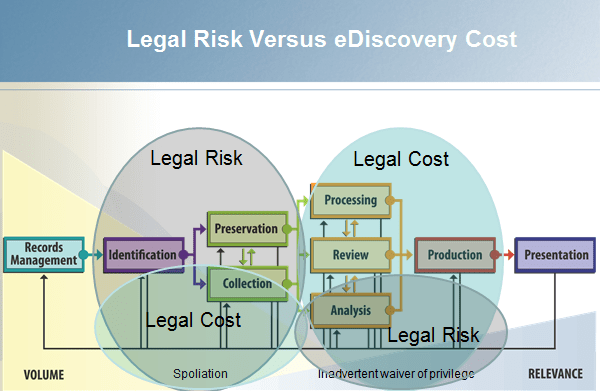
Based on what Brandon had learned during his observation and follow-up interviews, we looked at each step in the workflow in the context of the costs and risks of that step.  When we developed Attenex Patterns, we realized that we could provide a valuable product without having to automate every step in the eDiscovery workflow.  Further, we wanted to minimize our risks.  As we looked at each eDiscovery step, we realized that the four steps in the oval of “Legal Cost” were where we should spend our Augmenting efforts.  We could dramatically reduce costs and not incur a lot of legal risk for our clients or our company.
As we worked through the Chimerocyte workflow diagram, we assigned cost estimates for each step for materials, human labor, machine usage and capitalization for the existing process.  We then looked at each step from the cost perspective of a software developer to augment that step.  We then looked at each step from a risk perspective of the costs of getting something wrong at each step.  The two big risks Brandon faced were having something go wrong such that he needed to re-run the test and/or providing wrong information to the oncologist (a false positive or a false negative).

A simple heuristic for prioritizing which step(s) to augment is to find steps that have a high cost per test, a low cost for the software developer in terms of time and complexity, and a low risk.

The steps that met those criteria were the setting up of the lab machine and getting the results back from the lab machine (within the blue oval).  Brandon now had his starting point for where to prototype.
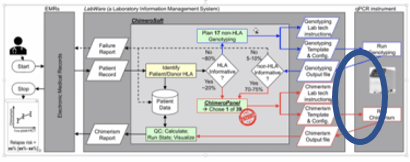
They built the prototype and then were able to test it on non-patient samples (a scarce supply).  They had their first win.  They could put this component into supervised use by the experienced lab technician and the scientist and measure whether they had a positive or negative effect on the per test cost.

They also made a complete loop through the “Observe, Don’t Ask” Cycle.
Brandon and his team are not ready to ship an MVP as they still have several steps that they want to automate like pulling the patient data from the medical record system.  However, they are well on their way by using video to observe the workflow and show the developers what actually happens in practice.  By having the video, they could also determine costs to execute the test.

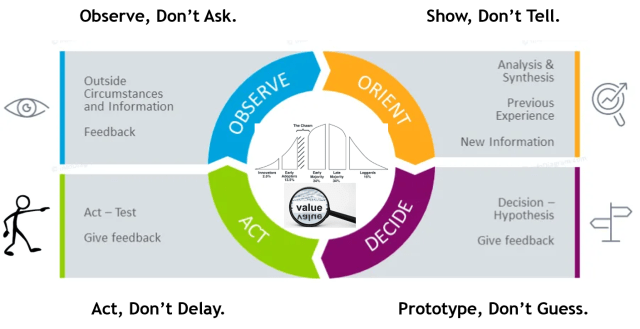
Observe, Don’t Ask.  Show, Don’t Tell.  Prototype, Don’t Guess.  Act, Don’t Delay.

    • Part 1   Observe, Don’t Ask.  Show, Don’t Tell
    • Part 2   Where does “Observe, Don’t Ask” show up in software product development?
    • Part 3   The OODA Loop
    • Part 4   Orient, Evaluate and Prototype
    • Part 5   Video Highlights for Show, Don’t Tell
    • Part 6:  Show the software, don’t try to describe it
Posted in Content with Context, Design, Learning, Patterns, Product, User Experience, Wake Up! | Leave a comment

Daily Moment of Zen: Labyrinth

Day 278 of Self Quarantine      Covid 19 Deaths in U.S.:  301,000   GA Vote!!

One of many hidden gems on Bainbridge Island – the Halls Hill Labyrinth.

Essays on this labyrinth from its designer and builder, Jeffrey Bale.

Posted in Daily Moment of Zen, Design, Nature | Leave a comment

Daily Moment of Zen: Wood Nymphs

Day 277 of Self Quarantine      Covid 19 Deaths in U.S.:  299,000   GA Vote!!


Posted in Daily Moment of Zen | Leave a comment

Annotating Zoom Meetings with Otter.ai

Day 276 of Self Quarantine      Covid 19 Deaths in U.S.:  298,000   GA Vote!!

Several times a year I meet with members of the University of Washington at Bothell Computing and Software Systems (CSS) Technical Advisory Board.  Due to Covid, these meetings are now on Zoom.

I enjoy the in person meetings primarily for the break periods to talk to other members of the board about their software development experiences in their companies.  The informal process of an in person meeting doesn’t translate well to a Zoom meeting unless you already know the other participants.

In a previous post (Design of an Experience meets OODA) I described how I am learning to use Zoom and Otter.ai to capture how to design better online experiences while also grabbing video ethnography artifacts for future research.  This process works well when I am hosting the Zoom meeting and using Grain.  Until this meeting I had not figured out how to do similar artifact capture when someone else is hosting the Zoom.

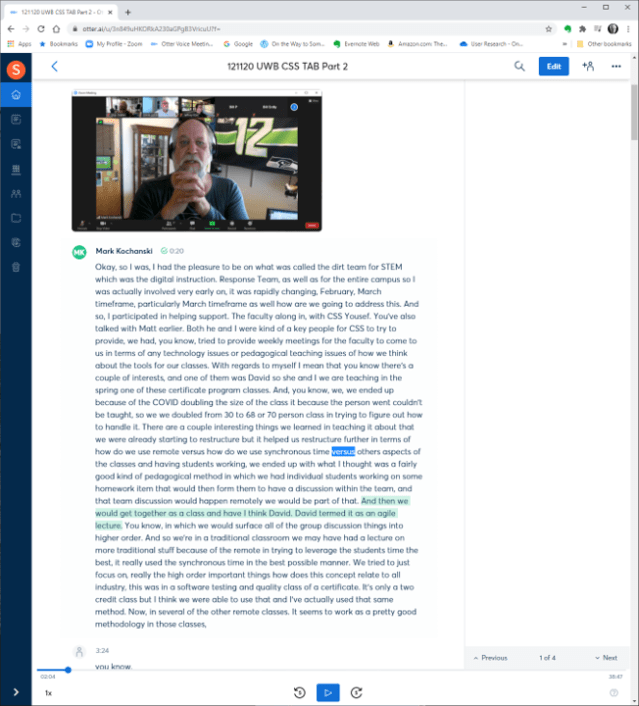
Otter.ai recently announced how their tool can provide real time transcripts of a meeting.  The hidden benefit of the new capability is that you can make annotations of the Zoom stream in real time.  One of the first talks was from Mark Kochanski about what the professors are learning about remote instruction during the age of the pandemic.  I was positive Mark was going to share something I needed to remember.

I felt comfortable testing the tool out during this meeting as the organizers announced the meeting was being recorded.

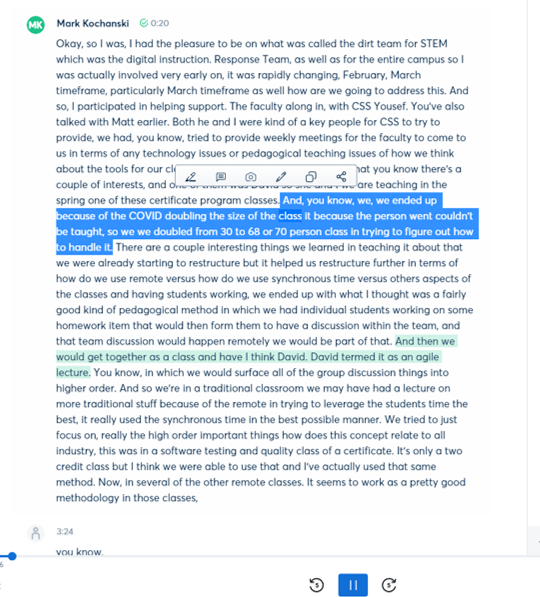
I first tried the highlighting tool.  With a simple flick of my computer mouse, I was able to highlight the text that I wanted to note and talk to Professor David Socha about later.

The highlight tool popped up and also suggest several other things I could do like insert a photo.  I quickly tried that.

While it is a little cumbersome to do, I mostly take screen shots of the people or slides I want to study a little more.  The tool is pretty quick to add the photo if it is in file form.

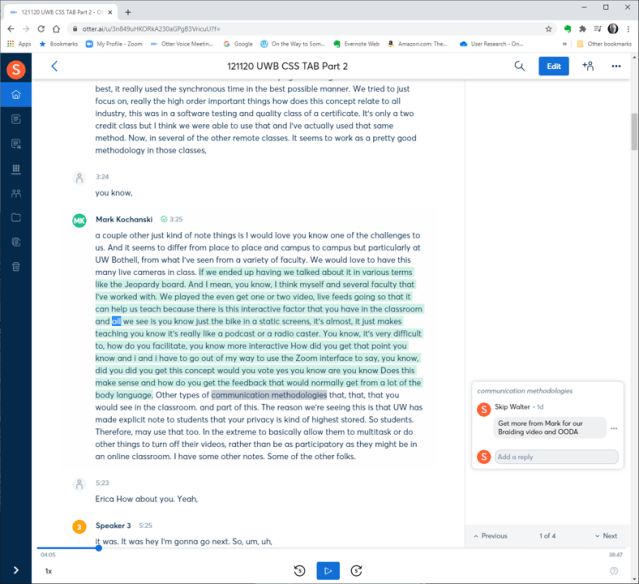
Next, I added a comment to remind me to chat with David Socha about how Mark’s learning might impact the paper we are working on.

I was pleasantly surprised to see that I could have two apps simultaneously using the microphone (Zoom and Otter.ai).  As I was in listening mode, the real time text was not that distracting.  In fact, the ability to quickly highlight along with making comments (notes) meant that I could focus on what was important to me from the conversation.

In Otter.ai, I couldn’t seem to label the speaker in real time.  I had to wait until the transcript was fully processed to go back and add the speaker names.

Later in the day I tried a similar real time captioning capability with Microsoft Teams and found the  real time caption feature quite irritating while trying to carry on a conversation with a colleague, because the captioning was in the same window as the video.

Slowly but surely the video technology and content analytics (speech to text) are allowing the quick creation and annotation of video.  Working with video now is as easy as it used to be taking notes by hand in a Moleskine notebook.  However, now I have the full context of the conversation AND the ability to search the conversation in real time and in the future.

I really like what Otter.ai, Grain.co, and Descript are doing to use the speech to text transcript as way to find and highlight text and video to share with other colleagues.  I particularly like that I can share what they had to say in their voice and with their enthusiasm rather than just dry text.

Thank you to the development team at Otter.ai for the real time meeting notes.

Posted in Content with Context, Curation, Flipped Perspective, Learning | Leave a comment

Daily Moment of Zen: Space Needle

Day 276 of Self Quarantine      Covid 19 Deaths in U.S.:  298,000   GA Vote!!

Posted in Daily Moment of Zen | Leave a comment

Daily Moment of Zen: Black Lives Matter

Day 275 of Self Quarantine      Covid 19 Deaths in U.S.:  296,000   GA Vote!!

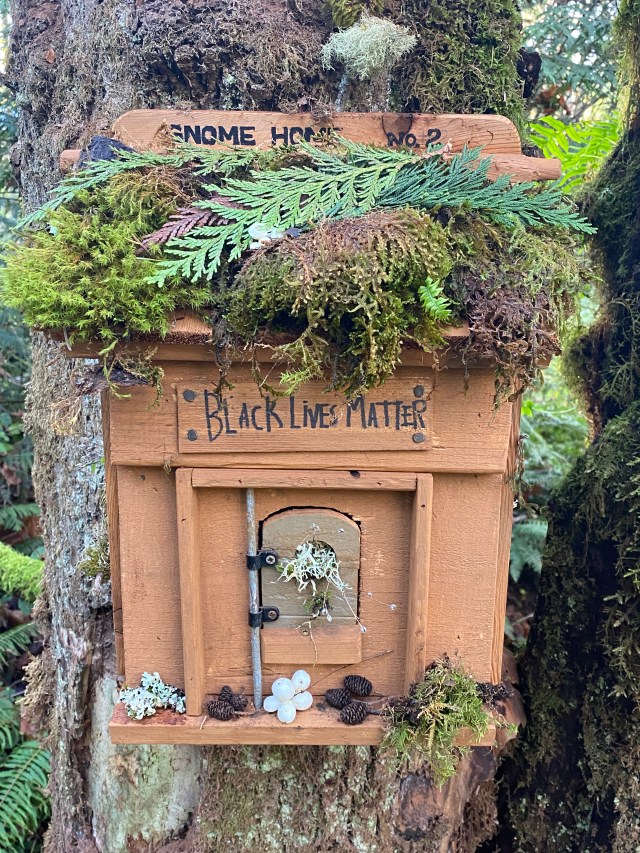
Even the gnomes know that Black Lives Matter.

Posted in Citizen, Daily Moment of Zen | Leave a comment

Lifelet: Observing a newborn

Day 274 of Self Quarantine      Covid 19 Deaths in U.S.:  293,000   GA Vote!!

Many moons ago when we were living in Charlotte NC and awaiting the birth of our first child, we went to dinner with my boss – Gerry Bryant.  I was 30 at the time and he was an ancient 50.  He shared that the only piece of advice he would give us about parenting was about the after math of the birth.

He asked us if we were going to use the Lamaze natural child birth method.  I said that we were.  However, I couldn’t believe that he had any idea what natural childbirth was about since he was so ancient.

Gerry shared that after the baby is delivered you are usually taken to a private “bonding room” area.  He said whatever you do make sure you make full use of that 30 minutes with just the father and the mother and the baby.  He encouraged us to make sure that we looked carefully at the facial expressions and body movements of the baby for as much of the 30 minutes as we could.

He said you won’t believe how those facial expressions in the first 30 minutes will be with your child for the rest of their lives.  We laughed and thanked him, but thought he was a bit crazy.

After a long and tiring labor process, we were able to get the 30 minutes by ourselves with our darling daughter.  We still see the facial expressions 40 years later that we saw in those first 30 minutes.

Gerry also said not to really take photos or videos during that 30 minutes.  Just spend the time imprinting the baby in your mind and helping the baby imprint the sights and sounds and smells of the parents.

For all three of our children, we still see those expressions.  Many times I have to stifle a bit of laughter when we see those early expressions emerge in our day to day interactions.  Each of our three kids had a different set of expressions that were uniquely theirs.

Posted in Lifelet, Observing | Tagged | Leave a comment

Daily Moment of Zen: Who is looking at whom?

Day 274 of Self Quarantine      Covid 19 Deaths in U.S.:  293,000   GA Vote!!

Posted in Daily Moment of Zen, Nature | 2 Comments

Daily Moment of Zen (DMoZ): Sunrise and Sunset

Day 272 of Self Quarantine      Covid 19 Deaths in U.S.:  286,000   GA Vote!!

The beginning and end of daylight surrounding Seattle and the Puget Sound provide a changing array of light shows.

Early mornings with clouds and marine layers provide phosphorescent oranges and pinks.

The sunlight reflecting off the Seattle built environment punctuates the subtle pinks and yellows of a sunset.


Posted in Daily Moment of Zen, Nature | Leave a comment

Design of an Experience meets OODA

Day 271 of Self Quarantine      Covid 19 Deaths in U.S.:  284,000   GA Vote!!

I am sometimes asked if I would coach or mentor an executive.  I usually agree.  I look forward to these engagements for the reciprocal learning.

One of my latest coaching experiences is for an executive looking to learn more about strategy.  After a couple of sessions, I realized my coaching style has evolved by combining the design of an experience framework that Vijay Kumar published in 101 Design Methods with John Boyd’s OODA process.

We meet once per week for an hour over Zoom.

Vijay’s design of an experience framework is:

What I love about this framework is that it is in three parts – attract, engage, and extend.  My shorthand is pre, during, and post.  Each part of an experience should be designed.

Prior to our coaching session I keep pages of thoughts, images, diagrams and text quotes in a GoodNotes 5 notebook on my iPad.  My iPad and Apple Pencil are always with me and any activity can trigger a concept I might want to talk about.

Prior to the meeting, I look over my notes and Otter.ai transcripts from previous sessions which includes any homework assignments to develop an outline of topics we might want to talk about in our weekly session.  These notes and a little organizing are my Pre-experience preparation.

At the appointed hour, I fire up my Zoomeroo system and enable the Grain real time transcript and note taking app. 

With the advent of video meetings and the quickly improving speech to text tools like Otter.ai, I am able to fully focus on my reciprocal learning partner.  In the past, in order to have a chance at remembering anything I took extensive notes in an ever present Moleskine notebook.  I mostly needed to see what I heard so that I could remember the conversation.  However, the notetaking distracted whoever I engaged with.  Now I can fully focus on the other person and absorb the non-verbal communication modalities that Mehrabian describes – the words that people say, the facial expressions while they are saying it, and the body posture and movements while expressing their thoughts.

I still type a few notes in real time (the panel on the right above) as an index into the conversation for later use.

It is during the engage portion of the experience that I tacitly use John Boyd’s Observe-Orient-Decide-Act (OODA) loop.  As I observe my learning partner, I am orienting to her needs, to her organization’s needs, and to the health care ecosystem that her organization resides in.

As the engaging conversation progresses, I decide to share one of the diagrams I’ve prepared in advance or I go to Google and search for a diagram or a web page about what I am trying to describe.  As our hour finishes, I act by suggesting a “home work” assignment for the next week.  The homework usually consists of observing something in her work environment that we discussed or to read a few articles.

After we sign off, I take an hour to review the “To Dos” from the meeting transcript which are usually creating a set of pointers to information on the web.  In today’s session we talked about the following topics:

I then follow the “To Dos” with more in depth discussion of the topics.

I go back to Grain and highlight the section of the Zoom transcript where we talk about the homework assignment and provide the link to the highlighted section.  

I send off this email summary as part of the Post-Experience and then create a new set of GoodNotes pages to capture my ideas for the next week.  I usually start a new week by pasting into GoodNotes the text of the homework assignment.

The GoodNotes preparation, the recorded video and speech to text transcripts, and my follow up email become part of my archive of learning and research for my Know Now “book”.

One of my mantras in coaching is:

People need what they need, not what I happen to be best at.

By using a combination of Kumar’s Design of an Experience and Boyd’s OODA Loop and the technology of GoodNotes, Zoom, Grain and Otter.ai I can quickly keep an engaging reciprocal learning experience going that meets my learning partner’s needs.  These new software tools allow me to do in a few hours what in the past took me a day or two.  Well, it almost never took me a day or two because I would never take the time to do what is so easy today with the combination of good process frameworks and good technology.

Posted in Design, Flipped Perspective, OODA, WUKID | Leave a comment