Daily Moment of Zen (DMoZ): Sunrise and Sunset

Day 272 of Self Quarantine      Covid 19 Deaths in U.S.:  286,000   GA Vote!!

The beginning and end of daylight surrounding Seattle and the Puget Sound provide a changing array of light shows.

Early mornings with clouds and marine layers provide phosphorescent oranges and pinks.

The sunlight reflecting off the Seattle built environment punctuates the subtle pinks and yellows of a sunset.


Posted in Daily Moment of Zen, Nature | Leave a comment

Design of an Experience meets OODA

Day 271 of Self Quarantine      Covid 19 Deaths in U.S.:  284,000   GA Vote!!

I am sometimes asked if I would coach or mentor an executive.  I usually agree.  I look forward to these engagements for the reciprocal learning.

One of my latest coaching experiences is for an executive looking to learn more about strategy.  After a couple of sessions, I realized my coaching style has evolved by combining the design of an experience framework that Vijay Kumar published in 101 Design Methods with John Boyd’s OODA process.

We meet once per week for an hour over Zoom.

Vijay’s design of an experience framework is:

What I love about this framework is that it is in three parts – attract, engage, and extend.  My shorthand is pre, during, and post.  Each part of an experience should be designed.

Prior to our coaching session I keep pages of thoughts, images, diagrams and text quotes in a GoodNotes 5 notebook on my iPad.  My iPad and Apple Pencil are always with me and any activity can trigger a concept I might want to talk about.

Prior to the meeting, I look over my notes and Otter.ai transcripts from previous sessions which includes any homework assignments to develop an outline of topics we might want to talk about in our weekly session.  These notes and a little organizing are my Pre-experience preparation.

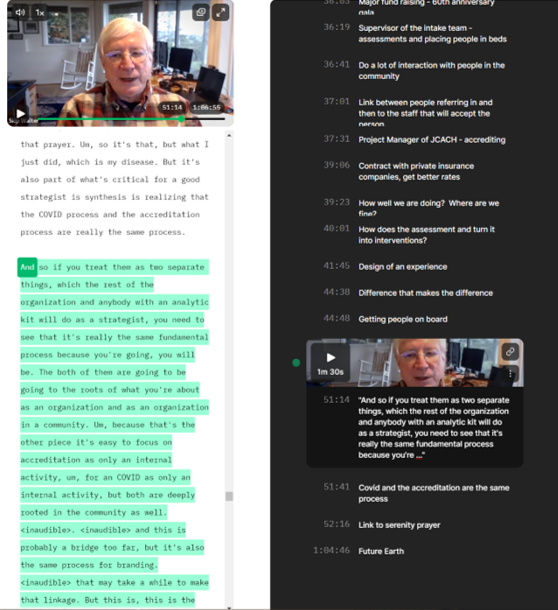
At the appointed hour, I fire up my Zoomeroo system and enable the Grain real time transcript and note taking app. 

With the advent of video meetings and the quickly improving speech to text tools like Otter.ai, I am able to fully focus on my reciprocal learning partner.  In the past, in order to have a chance at remembering anything I took extensive notes in an ever present Moleskine notebook.  I mostly needed to see what I heard so that I could remember the conversation.  However, the notetaking distracted whoever I engaged with.  Now I can fully focus on the other person and absorb the non-verbal communication modalities that Mehrabian describes – the words that people say, the facial expressions while they are saying it, and the body posture and movements while expressing their thoughts.

I still type a few notes in real time (the panel on the right above) as an index into the conversation for later use.

It is during the engage portion of the experience that I tacitly use John Boyd’s Observe-Orient-Decide-Act (OODA) loop.  As I observe my learning partner, I am orienting to her needs, to her organization’s needs, and to the health care ecosystem that her organization resides in.

As the engaging conversation progresses, I decide to share one of the diagrams I’ve prepared in advance or I go to Google and search for a diagram or a web page about what I am trying to describe.  As our hour finishes, I act by suggesting a “home work” assignment for the next week.  The homework usually consists of observing something in her work environment that we discussed or to read a few articles.

After we sign off, I take an hour to review the “To Dos” from the meeting transcript which are usually creating a set of pointers to information on the web.  In today’s session we talked about the following topics:

I then follow the “To Dos” with more in depth discussion of the topics.

I go back to Grain and highlight the section of the Zoom transcript where we talk about the homework assignment and provide the link to the highlighted section.  

I send off this email summary as part of the Post-Experience and then create a new set of GoodNotes pages to capture my ideas for the next week.  I usually start a new week by pasting into GoodNotes the text of the homework assignment.

The GoodNotes preparation, the recorded video and speech to text transcripts, and my follow up email become part of my archive of learning and research for my Know Now “book”.

One of my mantras in coaching is:

People need what they need, not what I happen to be best at.

By using a combination of Kumar’s Design of an Experience and Boyd’s OODA Loop and the technology of GoodNotes, Zoom, Grain and Otter.ai I can quickly keep an engaging reciprocal learning experience going that meets my learning partner’s needs.  These new software tools allow me to do in a few hours what in the past took me a day or two.  Well, it almost never took me a day or two because I would never take the time to do what is so easy today with the combination of good process frameworks and good technology.

Posted in Design, Flipped Perspective, OODA, WUKID | Leave a comment

Daily Moment of Zen (DMoZ): Wake Up!

Day 271 of Self Quarantine      Covid 19 Deaths in U.S.:  284,000   GA Vote!!

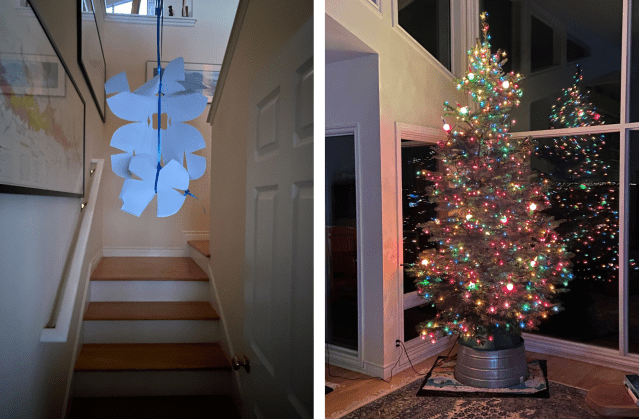
After an hour of early morning doom scrolling, I stumble towards the stairs to my kitchen to brew some morning coffee.  As I open the door, I am assaulted simultaneously by the evergreen aromas of a freshly cut Christmas tree and artful snow flakes dangled over the railing by my grand children.

Both unexpected stimuli shout through smell and feel, “Wake Up!” grand dude.

Guess I didn’t need the coffee after all.


Posted in Daily Moment of Zen, Wake Up! | 2 Comments

Daily Moment of Zen (DMoZ): The Old Man

Day 270 of Self Quarantine      Covid 19 Deaths in U.S.:  282,000   GA Vote!!

Posted in Daily Moment of Zen | Leave a comment

Daily Moment of Zen (DMoZ): A December Sunrise

Day 269 of Self Quarantine      Covid 19 Deaths in U.S.:  281,000   GA Vote!!

In the Pacific Northwest, we are starting a La Nina year.  Therefore, every morning sunrise is a visual delight to savor.

While I await the actual sunrise, I read while enjoying my coffee.  I am loving the book on the Future of Text.

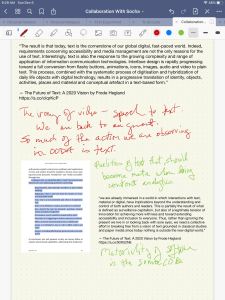
I just have to write some digital text, so I fire off this quick note to David Socha, my writing collaborator.

I am deeply, recursively meta this morning trying to absorb this “book.”

I may never be able to get through it.  It is 700 pages of 3-5 page essays.  Almost every essay pops off synthesizing and colliding brain cells.  Each essay involves many trips back and forth between my iPad Kindle reader app and the Good Notes app.  Sometimes copying the text as text.  And sometimes copying the text as a highlighted image to preserve the formatting.  And scribbling notes to indicate something of the importance of the quote.

It is deeply ironic that I am reading in book form, although in the immaterial environment of the iPad doing digital text manipulations.  Material text or digital text?  The same and yet different.

This interaction with the text makes clear that I can’t deal with the text in a linear flow.  The text is too evocative and thought provoking.

This morning’s “ah hah” is the duality of “Observe don’t ask“.   So much of what I am valuing about video is that I can now automatically transcribe the text through tools like Otter.ai.  And even what we are observing in order to build our software products is gobs of text – both material and digital.  Texts surrounding a computer that the user might be referring to.  Even the lab machine that Brandon is observing has gobs of text in the instruction manual that is constantly accessed and the digital interfaces on the lab instrument.  If there is a computer screen in the video, it is filled with text for what actions to take next and text labels on any visualizations.  Text is content.  Text is command buttons.  Text is context.  Speech to text software transforms audio into text.  Text is report output.

Even though we are emphasizing OBSERVE with video, we can’t get beyond text.  It is omni present.  Even in John Boyd‘s modern jet plane where he discovered the OODA process, the cockpit is now almost completely video monitors.  They display gobs of text and numbers as annotations on the visualizations.

And “SHOW, don’t tell” has text emanating from what is being viewed.

Swirls of text are moving from my Kindle reader and exploding wildly through my neurons and then coming out on a keyboard trying to explain this to you.

My notes are another way of saying how hard it is to decouple natural language and video.  Does it make sense to decouple Observing and Orienting and Showing and Acting?

But now I must return to my viewing window upstairs to watch the emerging sunrise, for it is a rare clear day in the Pacific Northwest.

NOTE:  I love “waking up” to the many encounters with life and nature during this time of self-quarantine.  I try every day to find a “daily moment of Zen.”  I know that I appropriated this phrase from somewhere else.  It turns out it was from the Daily Show.

Posted in Daily Moment of Zen | Leave a comment

Lifelet: A Gift of the Pandemic

Day 269 of Self Quarantine      Covid 19 Deaths in U.S.:  281,000   GA Vote!!

Three days a week two of our grand daughters show up for a day at Grandma Jamie’s remote online school.  I get to help with their schooling.  A few days ago, I was the substitute “teacher” for most of the day.

I get to watch a second grader and a kindergartner adapt to the new normal.  I get to experience amazing teachers coping with the move from in classroom teaching to Zoomeroo.

Most especially I get to observe the growth and development of two special young women.

Due to the nature of my professional work travelling >100,000 air miles for most of the last 40 years, I missed the formative years of our three children.  My wife got to experience the ups and downs and challenges of being a “single” parent while I focused on making a living.

The gift of the pandemic is glimpsing what I missed all those years ago.

The day starts with mom or dad dropping off the days selection of stuffies, backpacks, lunches and the girls.

They quickly move to their respective rooms to jump on morning Zoom.

Multi-tasking with an ever present array of art projects is the norm.

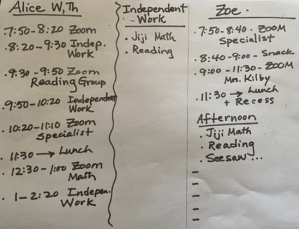
Grandma Jamie takes the teachers’ plans for that day and translates them into a schedule so we know when to monitor their independent work or when to get them on the appropriate Zoom.

It is a full time job to keep the day moving and making sure that the independent work gets done.  I usually do the snacks and lunch setup while being on call for any technical support issues.  There are always technical support issues.  And it takes a lot of food to fuel the energy it takes to concentrate on Zoom.

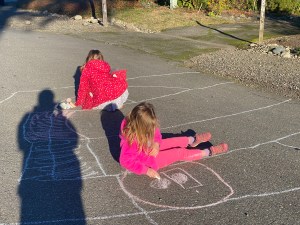
When the weather is nice, I get to supervise outdoor play time.  Pleasant weather Fridays are chalking our street time.

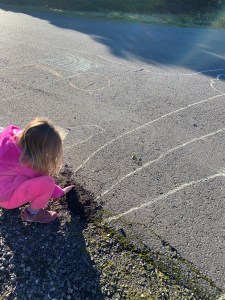
I love their creativity.  Zoe drew a tree.  She decided it needed to be planted in some dirt to help it grow.

Did I mention the teachers and subject matter specialists are amazing? Zoe’s teacher is a non-stop energizer bunny.  Alice’s teacher is encouraging in every interaction.  We are so lucky to be able to help out and live in a community with a strong commitment to education no matter what.

No matter how hard we try, we occasionally miss the start of a Zoom session while working on their independent tasks.  It is not just the face to face time on Zoom, it is all the prep that the teachers put into the daily independent activities they set up on SeeSaw.  The teachers also prepare a weekly bag of activity materials that the parents pick up at the school.

We are deeply grateful to all of those who are adjusting to the pandemic to support the needs of our children.  I am grateful that I get the chance to observe so many times a week the energetic, creative and adaptive points of views of our grand children.

Posted in Family, Learning, Lifelet | Leave a comment

Lifelet: A walk in the woods in between rain showers

Day 247 of Self Quarantine      Covid 19 Deaths in U.S.:  245,000 

As I doom scrolled through my morning twitter feed, I clicked through to McSweeney’s for a little morning humor to interrupt the many existential crises:

IF A TREE FALLS IN A FOREST…

(2020 EDITION)

In 1820…

“A tree falls in a forest, and no one is around to hear it. It can’t be determined if it made a sound.

In 2020…

“A tree falls in a forest, and no one is around to hear it. However, a surveillance drone captures the tree falling on video.

“A scientist studies the video of the tree falling and then creates a study of why the tree fell. The scientist publishes a report, concluding that the tree fell prematurely due to accelerated soil erosion driven by climate change.

“The Sierra Club tweets out the report with the attached video of the tree falling to draw attention to the effects of climate change. It soon goes viral with fans of the environment everywhere.

“The video is reposted on a conservative Facebook page calling the report bogus. They put out a statement that the tree fell of its own free will and was not co-opted by some leftist climate movement.

“In response, a new Facebook group, “Friends of the Fallen Tree,” is created to counter misinformation spread by conservative media.

“Rush Limbaugh catches wind of the story. He claims that, rather than climate change, the tree was strangled to death by excessive tree-hugging and blames environmentalists for it falling over. The President retweets the claim. . .”

I think you get the idea.  But now the meme was firmly lodged in my feeble brain.  I knew I had to get into the woods for my morning walk to see if there were any trees that had fallen in the previous night’s wind storm.

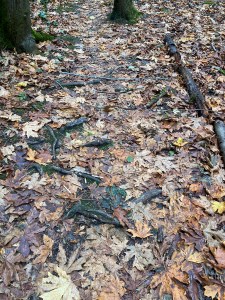
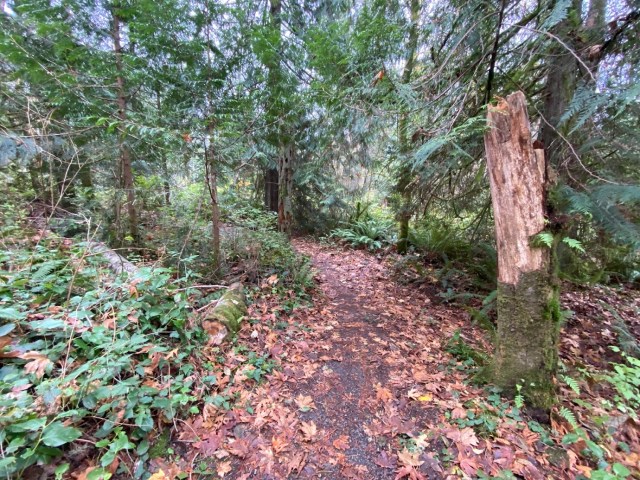
I have to be careful this time of year as the fallen wet leaves obscure the many roots that are waiting to trip me up.  I have to move slowly and stop to see if there are any fallen trees near the trail.

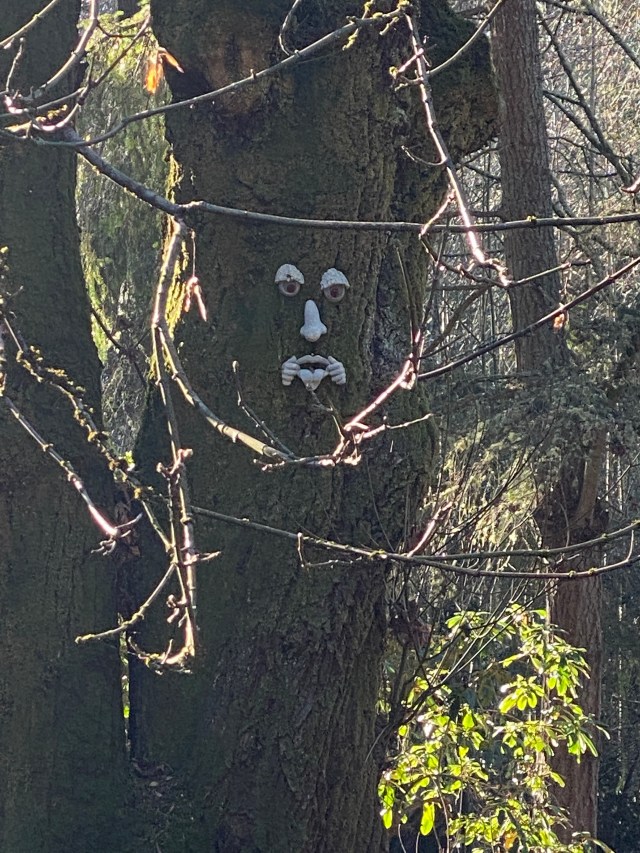
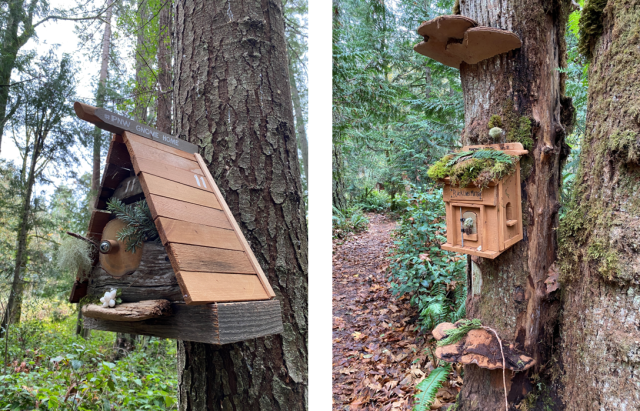
As the trail widens I look forward to greeting the gnome homes and seeing what decorations adorn them.

Just a few yards from the Black Lives Matter gnome home, I stop at a recent fallen tree.

Did anybody hear it fall?  Did a drone capture its demise?  Fortunately, the magic trail clearing sawyer cut up the tree and moved the tree chunks.  Does this constitute a crime in 2020?  Do I have to be on the lookout for young men practicing “renegade tree falling”?

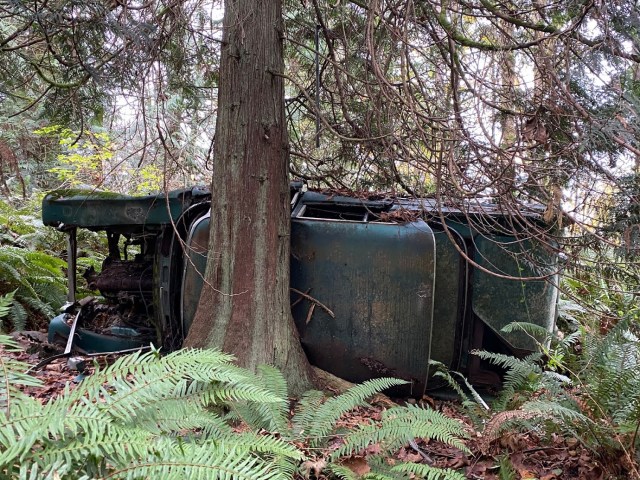
Now I am truly stumped.  What do I do with this travesty against nature?  The tree didn’t fall, the car did.

This tree just jumped out and crashed this old car.  Clearly, the car has been here for generations.  Did anyone hear the crash?  Did it really happen?  Inquiring 2020 minds want to know.

My trek through the woods on a rainy day is fun now.  How easily a little humorous essay can change my walk as I continue my quest to see fallen trees.

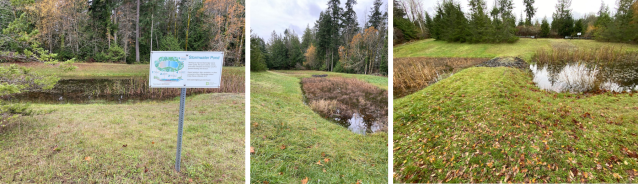
I stop on all three sides of the Wacky Nut Horse Farm Storm Water Ponds noticing how full both ponds are.  We must have had a lot of rain the last couple of nights.

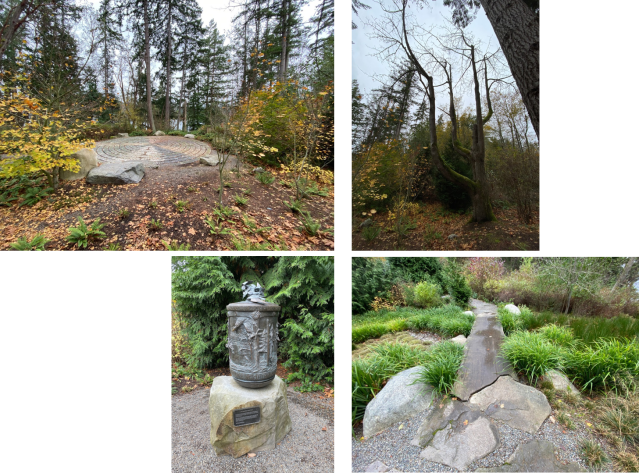
I continue my search for fallen trees as I walk through the Labyrinth.

I really want to walk the slick stone labyrinth but the fallen leaves and slippery rocks caution me to wait for another day.  I stop and say a few prayers in the prayer wheel garden while listening to a seaplane take off below me in Blakely Harbor.  I absorb the patterns of nature and the rearrangement of nature by the women and men who created this little oasis.

I reflect on Marcia Bates definition of “information”:

“Information 1 is defined as the pattern of organization of matter and energy.

“Information 2 is defined as some pattern of organization of matter and energy that has been given meaning by a living being.

“Knowledge is defined as information given meaning and integrated with other contents of understanding.”

Bates, Marcia J.. Information and the Information Professions: Marcia Bates Selected Works, Volume I (p. 3). Ketchikan Press. Kindle Edition.

I am awash in Information 1 and Information 2 as I try to make meaning of the flow of cycles of nature and man.

I keep moving in my search for more fallen trees.  Alas, fallen trees are everywhere.  They’ve been falling along this trail for a 100 years.  Most are covered in moss and ivy and blackberry bushes.  Did anyone even notice?  Or hear?

Did anyone hold a DiCaprio ceremony for these fallen trees?

“In a tragic turn of events, the tree and square miles of the surrounding forest are completely destroyed in a fire caused by a gender-reveal party stunt gone wrong. (It was a boy.)

“Spearheaded by Leonardo DiCaprio, a fund supported by Hollywood celebrities pays for the ashes of the “falling tree” to be collected and interred at Forest Lawn Memorial Park. In his eulogy at the tree’s memorial service, DiCaprio noted, “We have brought the tree here to our special ‘forest,’ where it can remain a symbol to remind future generations that we need to stop trees from needless falling.” They watch the video of the tree falling in silence.”

I am glad I spent time at the gnome homes and at the Labyrinth saying a few prayers for all the fallen trees that made my walk today an inspiration.

Posted in Biodynamic, Citizen, Climate Change, Exercise, Lifelet, Nature | Leave a comment

Good Notes 5 – Surprised by Joy Some More

Day 218 of Self Quarantine  Covid 19 Deaths in U.S.:  219,000   VOTE!!

Certain to Win: The Strategy of John Boyd Applied to Business by Chet Richards is one of the books that Professor David Socha and I are referencing for our upcoming papers on “Observe, Don’t Ask.”  

In “Good Notes 5 – Surprised by Joy” I shared how amazed I was with the ability of the app to read my handwriting and then make it searchable.  In “What is a Book?” I described how many moons ago I completely shifted to Kindle digital books on the iPad for all of my reading.  I described the many benefits of the Kindle app including the ability to highlight and make notes about what I was reading and then have them available to search.

David sent me the following:

“I spent way too long reading Certain to Win last night. And then again early this morning, after which I went back to bed to sleep some. . . 

“Attached are my notes. Both from our session yesterday, and from my reading last night. One of the best parts of my reading session last night, was that while reading and annotating Certain to Win in Goodnotes, I came to a point where I wanted to add more notes than I could in the margins of the page. And then I realized that, wait, this is just a set of pages in Goodnotes, so I could add a page in the middle of my book! See the attached image. I was so used to thinking about this as a book that I am marking up, that I had forgotten / had not realized that the material of the book was different. That I could take advantage of all of the aspects of the materiality provided by Goodnotes. So I added a blank page into the middle of the book. Then I used the “Take Screenshot” feature to capture snippets of the text and pasted them into my notes, sizing them appropriately. What fun! And during this process I felt surprised that doing this was a revelation. “

Wait, What?

You can inhale a whole book length PDF into GoodNotes and make handwritten notes which are then recognized and they become searchable just like the rest of the book.  And both the original book and my notes show up in the same file?  You mean I don’t have to search inside the Kindle book AND then go to the highlights on the Amazon web site.  

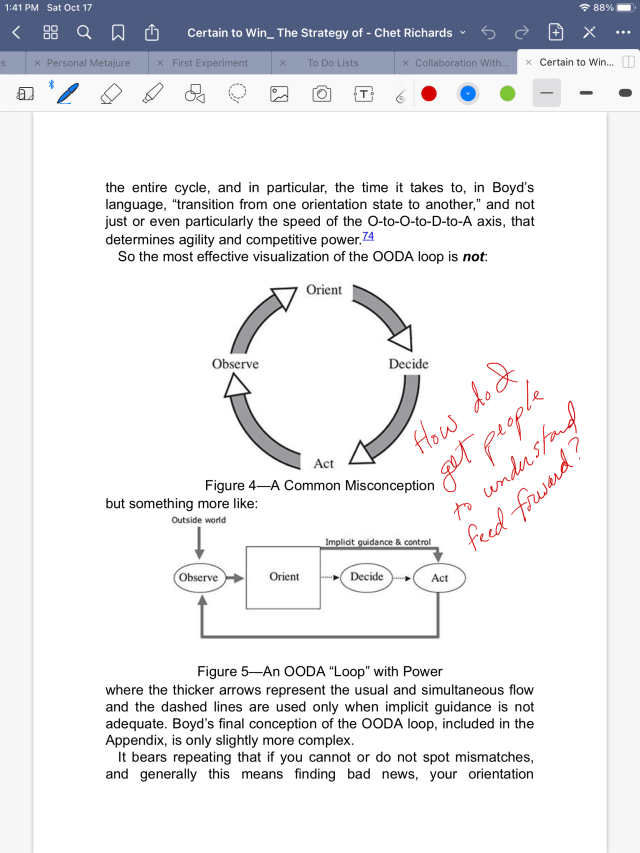
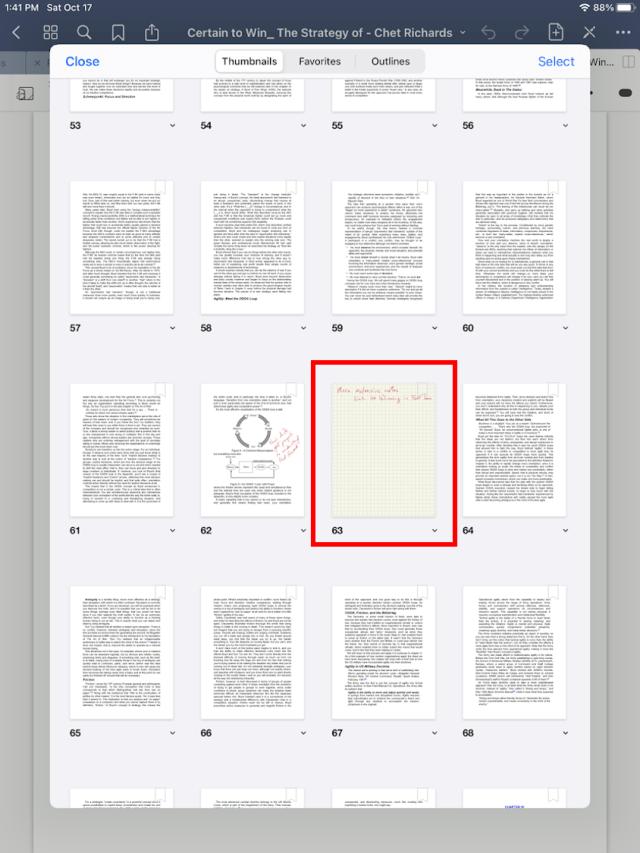
I immediately have to try this for myself.  I download the Certain to Win PDF and search for the OODA loop page.  I then make some notes.

Way cool.  Writing notes in the margins is exactly what I used to do with paper based books.  Now I can do the same thing with a digital book.  Can I search what I just wrote?

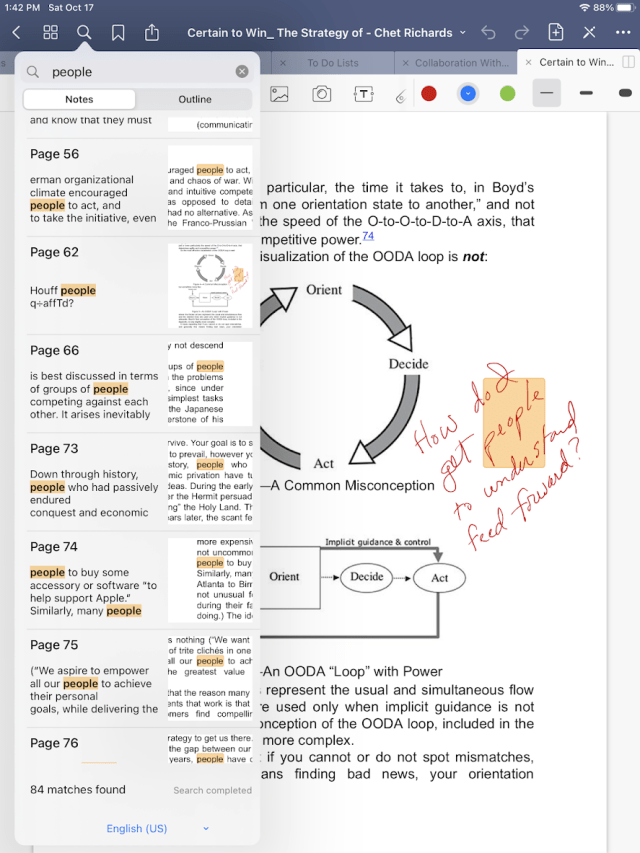
Are you kidding me?  Even with the text written sideways, GoodNotes 5 was able to recognize “people” and then include the search result in with all the digital text search results.

I trust David’s report but I have to see for myself that I can add an extra page to write more extensive notes.  It is just that easy.

With the combination of being able to have my collection of digital Kindle books with handwritten notes in a single app, I am in tech nerd heaven.  Because it is saved in PDF format, the searchable text is available on any of my devices.  It’s taken 20 years since I first glimpsed this kind of capability and now it is here.  Not only is it here, but it is far better than I imagined.

This new capability is a “back to the future” of matching digital affordances with how I want to work.  I can work like I want to and yet my work is fully digital and searchable and malleable and remixable just as Lawrence Lessig talks about in Remix: Making Art and Commerce Thrive in the Hybrid Economy.

Thank you Amazon (Kindle eBooks), and Apple (iPad with Apple Pencil), and GoodNotes 5.  You’ve made my day on a rainy fall day in the Pacific Northwest.

And thank you David Socha as always.

Posted in Content with Context, Design, Know Now, Learning, Lifelet, Software Development, User Experience | Leave a comment

Good Notes 5 – Surprised by Joy

Day 212 of Self Quarantine  Covid 19 Deaths in U.S.:  214,000   VOTE!!

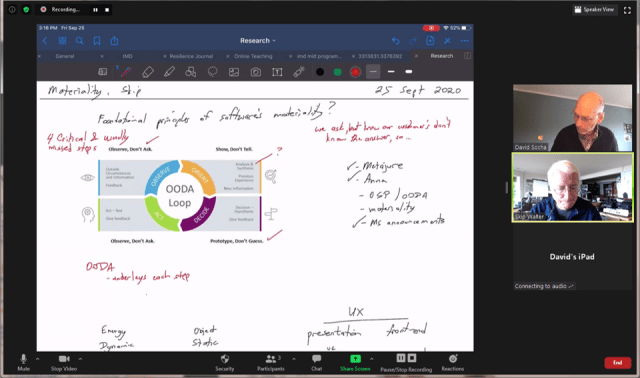
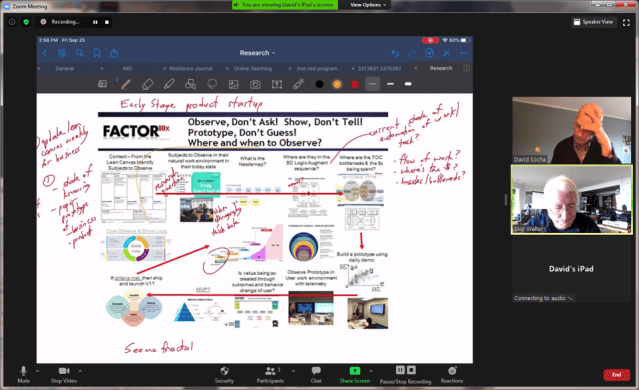
As Professor David Socha and I were collaborating on a paper about “Observe, Don’t Ask” and its role in the software product development life cycle, he pulled out his iPad and Apple Pencil and asked if he could share his notes.

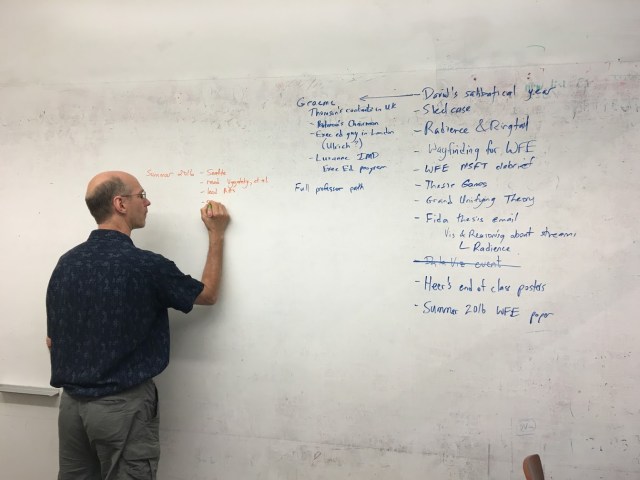
For 20 years, our medium of collaboration was a white board.  We would find a conference room with the biggest expanse of white board and begin a collaboration session.  We’d both bring several colored markers to separate our notes while we visualized our thoughts.

At the end of a session we would take photos of our notes and use those images as fodder for our next round of collaborative writing.

Yet, since March and the Pandemic quarantine, we’ve been severely limited in our ability to collaborate around a white board.  Now, Zoom is our medium of communication.  Instead of a white board we are usually restricted to sharing a web page or a powerpoint presentation and talk around the shared screens.

The good news about Zoom is that we can continue our collaboration remotely AND capture a searchable transcript through Otter.ai.

Yet, something magical happened when David started writing notes on this iPad.  For me, it transformed the experience into being back at the white board.  We were fully collaborating again.  Could it be as simple as the pixellated bits on the screen or was it being able to observe and think at the speed of writing.  Instead of a complicated slide being blasted into my feeble brain, the beauty of handwritten notes allows me time to absorb and process the meaning.

Meaning and understanding at the speed of writing.

While Zoom has the annotation capabilities, it is hard for me to write using a mouse.  It is far more natural to write with an Apple Pencil on an iPad.

I am giddy being able to almost experience whiteboarding with David again.

I finally ask David what application he is using on the iPad.  Goodnotes he shares.

I download it.

I decide to do my morning notes on my iPad this morning instead of in my current Moleskine notebook.  For over 30 years, I’ve carried a Moleskine notebook with me where ever I go.  Today, I will try something different.  

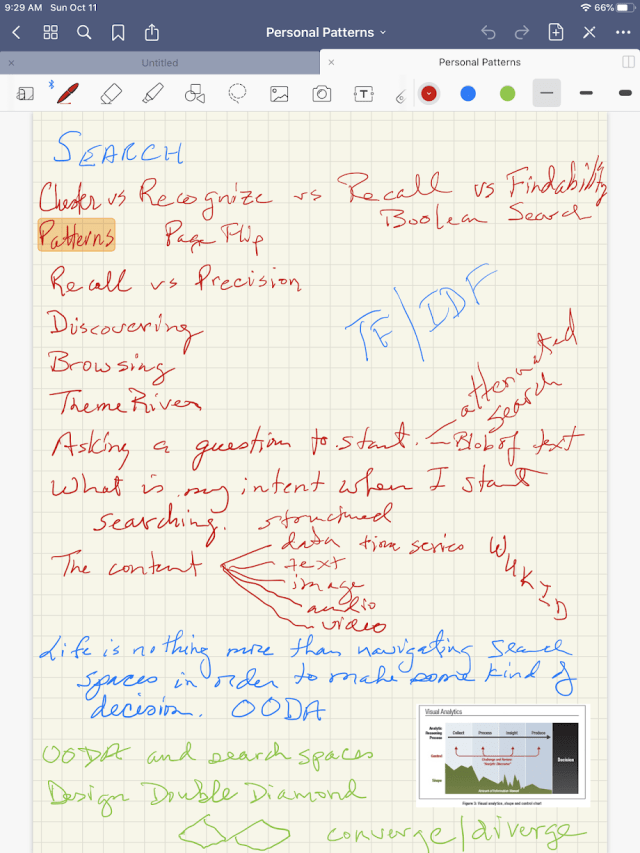
I wanted to jot down some thoughts about a blog post on searching and a tool I want to build – Personal Patterns.  I create a notebook from a library of templates and start writing.  Unlike with a Moleskine, I can change the colors of my ink, or type something, or drop a diagram from my photo library onto a page.  I can write my notes or annotate a diagram.  It is fluid and easy.

I continue making notes for an hour without thinking about the transition to this new medium.

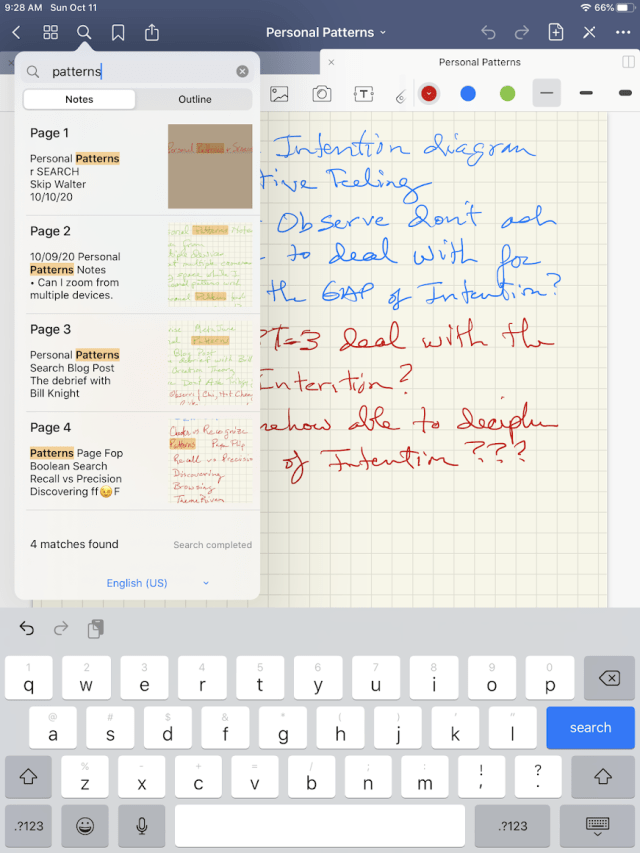
As I stop, I need to somehow save the notebook I am writing in.  I find the save button and also notice a search icon.  “Nah,” I say to myself.  “They couldn’t possibly be OCRing my hand writing and making it searchable.”  So I try searching for “patterns.”

Now I am bouncing in my seat being surprised by joy.

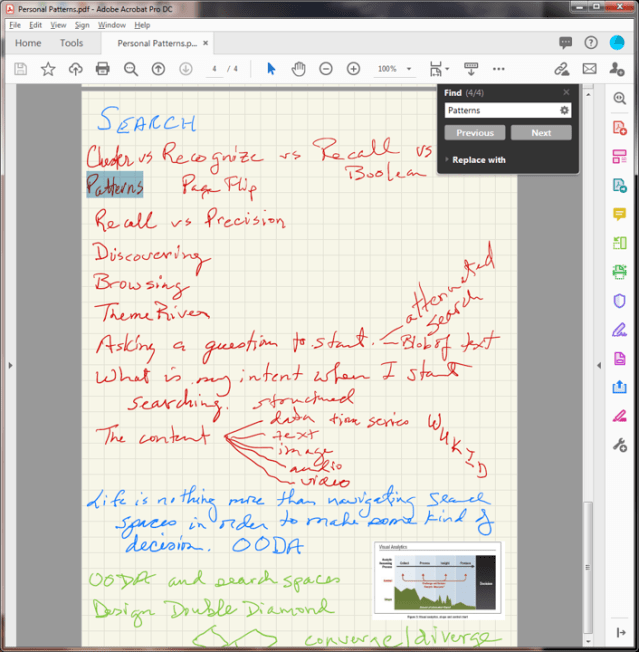
Then, I wonder if when I sent the PDF of the notebook to myself that it created a searchable PDF.  On my desktop, I open up the PDF image file.  Up pops all the instances of “patterns.”

Once again the iPad platform and a terrific app like GoodNotes helps me to shift away from paper to digital.  I was overjoyed when I was able to shift from paper based books to the Kindle digital format.  Now, I can do the same thing with my note taking.  My back pack just got lighter once again. 

As with all of the advantages of shifting from paper books, everything I write is now saved in multiple places (iPad, desktop, the cloud) and it is searchable.  I can find notes in my notebooks, just like I can find notes and annotations across my Kindle digital books and within Evernote.  If I could only get 30 years worth of Moleskine notebooks into GoodNotes, I would really be a happy digital native.

In the midst of our pandemic and all of our existential crises, I am surprised by joy once again with how much easier my work and my collaborations will be going forward.  

Thank you, David Socha!

Posted in Content with Context, Design, Know Now, Learning, Lifelet, Software Development, Uncategorized, User Experience | 3 Comments

Observe, Don’t Ask. Show, Don’t Tell. Part 3

Day 200 of Self Quarantine             Covid 19 Deaths in U.S.:  205,000

Rest in Peace Justice Ruth Bader Ginsburg                                   VOTE!!

Professor David Socha asked me a second question after “where do you observe different parts of the software product development life cycle – what is the diagram that shows where to observe?”

I am continuously sketching the answer to David’s question.  As usual, I start with the complexified version of the diagram.  Over the last week, David and I discussed, debated, added and subtracted a lot from this diagram.  This blog post is the first attempt to come up with a diagram of an Agile OODA (Observe – Orient – Decide – Ask) HCD (Human Centered Design) Loop (virtuous cycle) for software product development.
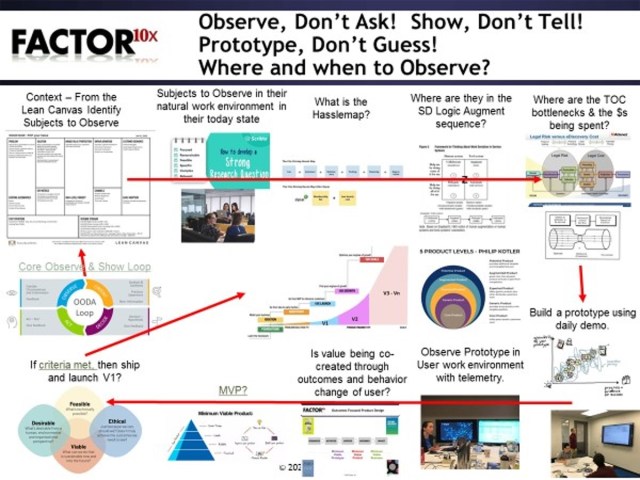
As I stare at this diagram, I realize it is more of a macro diagram and is heavy with framework systems that require a lot of description and unpacking.  And this diagram is “simple” because I would really mess it up more if I added all the loops of iteration throughout the diagram.

David did a nice job in “Observe, Don’t Ask Part 2” of enumerating all of the activities in the software product development life cycle where you either need to Observe or Show.  The more interesting question is where you wouldn’t do Observe or Show?  We both realized the challenge of trying to document what we mean versus showing a more complete context of what we mean.
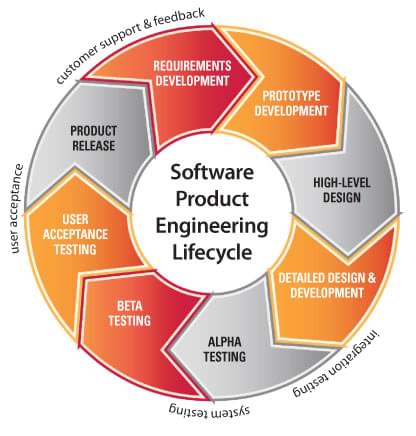
As I tweaked the above diagram, I wondered if there was a diagram that showed the feedback and feed forward loops  or maybe a Venn diagram to illustrate relationships in a clearer way.  As I doodled with different loops, I realized that I had not referenced the OODA Loop that John Boyd developed as a fighter pilot.

Boyd’s work in developing the Observe-Orient-Decide-Act loop was an important step forward in military tactics.  This strategy was the basis for our winning so quickly in Gulf War I and was adapted for business and commercial use in the books Winning in Fast Time and Certain to Win.  While Boyd did not write any books, he was famous for putting his materials into an extensive slide deck and giving the presentation to anyone who would listen.

Boyd’s original OODA loop diagram looked like this:

I love that there are both Feed Forward arcs and feedback arcs.

The folks at IMARC AI provide a simpler update of the original OODA loop.
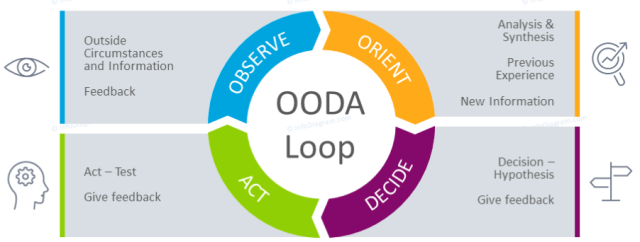
As I play with this simplified diagram, I realize it fits nicely underneath all of the steps and frameworks in the complex diagram.  The “observe” step is obviously the “observe, don’t ask” step.  The “orient” step fits nicely with what I mean by “show, don’t tell.”  The “act” step needs a reminder of don’t dilly dally with “Act, don’t delay” which is the fundamental speed insight of Boyd.  The decide step fits a mantra of “prototype, don’t guess.”  So many times in the product development process, the software engineers are forced to guess what is meant by a user story or a requirements document or a short discussion during a daily stand-up.  What human centered design practitioners learn early on is to do rapid prototyping even if it means doing paper prototyping.

I can’t help myself and realize that I have to add to the simple OODA diagram.  While I love the original icons, I didn’t like the ACT step as it implied thinking to me.  Acting is about moving and I wanted to have something that had hand movement.  I also felt that there needed to be something in the middle that was an indicator of the “so what.”  Where does the OODA loop for software product development lead – to value.
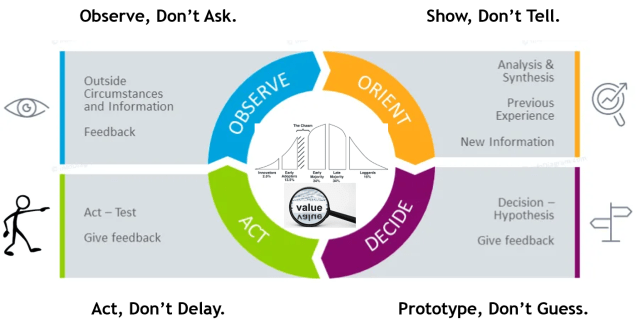
For each step in the complex diagram (and the many sub-steps), the work is about figuring out what to observe, and then what insights arise from the observation, that need to be carried to the next step to “show” the developers.   At each step there are one or more decisions.  Some of those decisions can be made based on “patterns that repeat.”  Others require some rapid and iterative prototyping.  The prototyping takes the guess work out of deciding what needs to be built – the “act” step.  Then once something is built, that prototype needs to be observed in use “in the wild” of an actual user’s environment.

Then, the OODA loop repeats until there is a measure of good enough as described in the Part 2 blog post.

“To claim that any given thing is Good Enough is to agree with all of the following propositions:

              • It has sufficient benefits.
              • It has no critical problems.
              • The benefits sufficiently outweigh the problems.
              • In the present situation, and all things considered, further improvement would be more harmful than helpful.

The micro level OODA loop steps for software product development are:
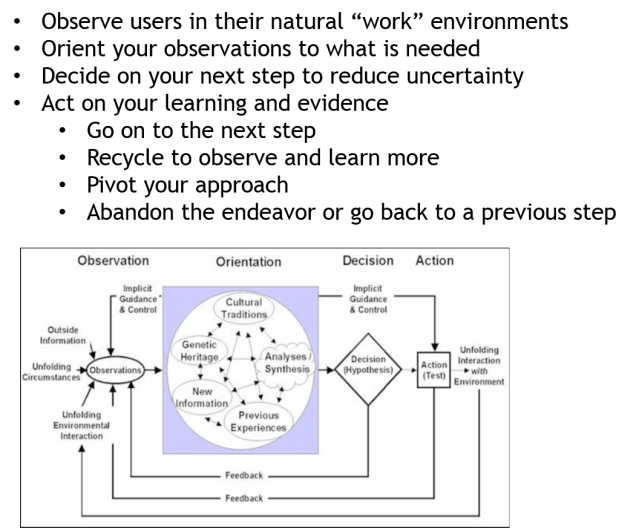
Now that we have an idea of the core process underlying the more complex model, let us look at the components of the larger model.  The descriptions that follow assume that we are in an early stage startup where the product and the company are mostly the same thing.  Inside a large company the equivalent is intrapreneuring where a new product and new business are created together.

The macro OODA loop for software product development has several internal and external components.  The Observation step in the macro OODA loop is:
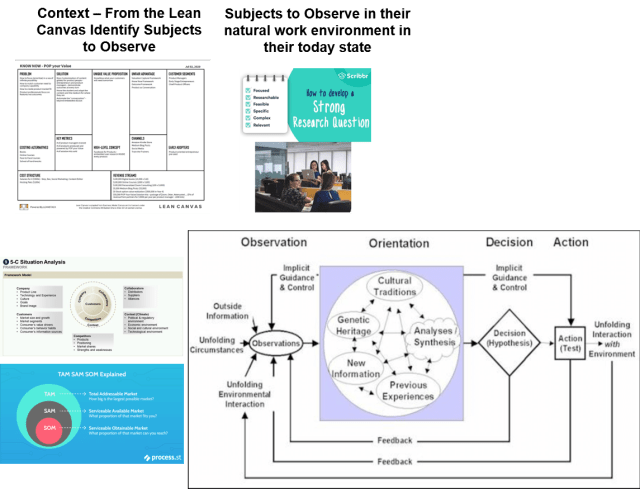
Over the years I’ve learned to start any new product idea by trying to fill out the nine boxes of a lean canvas.  The lean canvas below is an early draft I did for the Know Now book I am writing:
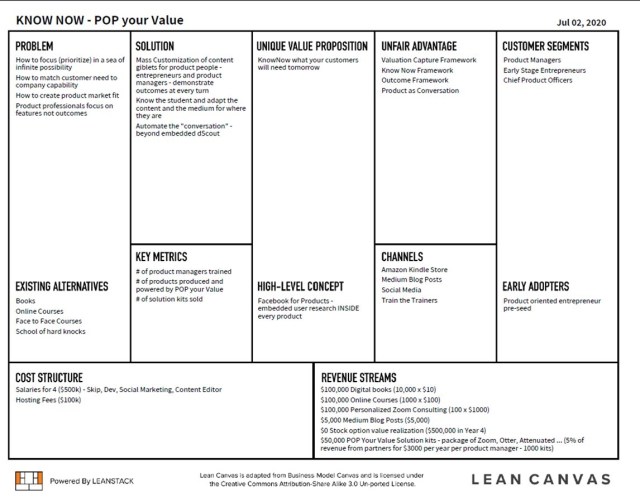
The lean canvas is a paper prototype of your product and business idea.  Filling in each box gives you a quick way to see what you know and what you think you know (The Four Boxes of Knowing).  The work is to figure out which box of content you know the least about.  That box becomes the priority to learn more about.  Most early stage entrepreneurs leap right into the Solution Box and have a wide range of ideas of how to solve for some problem.  Over the years I’ve found that I rarely understand the problem or the existing alternatives and who the early adopters might be.

For the Know Now book project, my hypothesis was that the early adopters would be product managers.  While I have done product management off and on for 20 years, I realize how little I remember about how I educated myself about product management.  So the first thing I needed to learn about is product managers and how they learned to become a product manager.

The key components of the Observe step come from the Human Centered Design process that I learned about at the Institute of DesignIdeo offers a range of online courses and extensive consulting services that help companies implement a robust human centered design process.  A starting point for learning about Human Centered Design is Vijay Kumar’s book on 101: Design Methods.

As I interviewed several product managers, I was also coaching several early stage startup CEOs.  I realized that one of the challenges in an early stage startup is that the CEO acts as the product manager due to lack of funds.  In an early stage startup, the product and the company are one and the same.

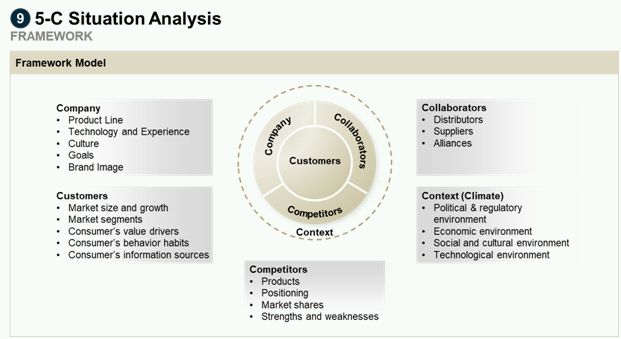
In parallel with identifying users to observe, the CEO as product manager is also developing a business plan for the product and trying to understand the external environment as depicted in the micro OODA loop.  Useful frameworks for observing the external world are captured in the Scenario Planning Process and in collections of useful frameworks.  The kinds of information that the CEO is looking for are social dynamics, economic issues, political issues, technological issues, culture trends, legislative and regulatory trends, and ecological issues.
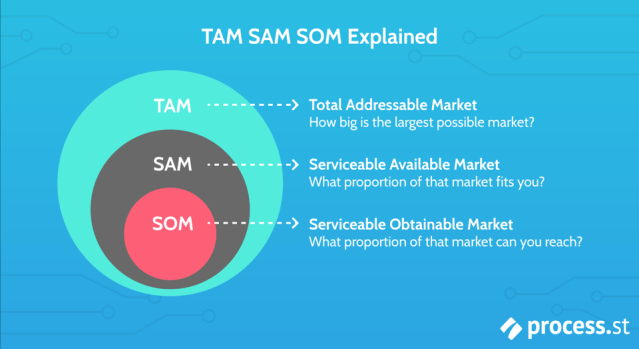
Along with observing external factors, the CEO is always trying to estimate TAM, SAM and SOM for the potential product.
Now that you have identified the users to observe and performed the observations (where possible using video ethnography), then it is time to ORIENT.  The Macro OODA Loop for Orientation is:
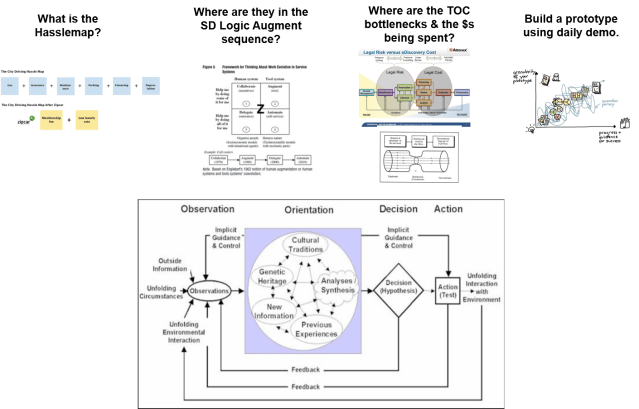
As you make sense of your observations there are several frameworks that guide what to look for.  The observations should include the full flow of work.  Within the flow of work you are looking for the hassles that a user encounters.  Adrian Slywotzky describes hassle maps in his book Demand: Creating What People Love Before They Know They Want It and in a short monograph on The Art of Hassle Map Thinking.

An example of a hassle map is the one that Zipcar created:
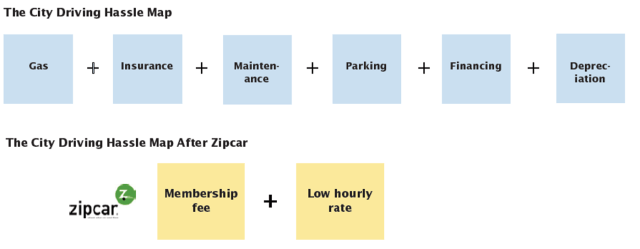
No matter how manual or automated a given work flow is there are still hassles that a user must overcome.  This step of the Orient process is to identify all of the hassles and to start looking for solutions to eliminate the hassles.

Service Science emerged from IBM as their business transitioned from hardware to software to services.  Jim Spohrer in “The Emergence of Service Science: Toward Systematic Service Innovations to Accelerate Co-Creation of Value” provides a diagram of the evolution of automation of a manual task.
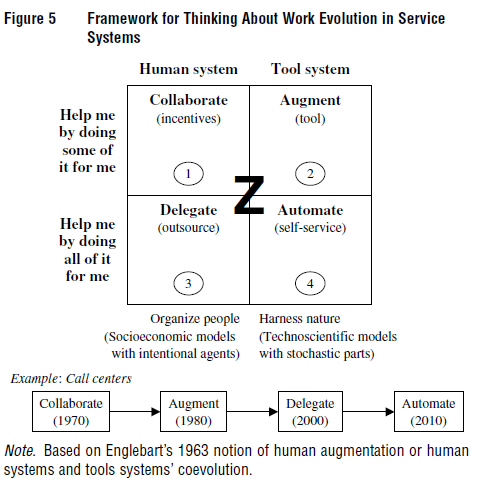
After identifying the hassles of a user, the next step is to understand where the user’s work environment is in the sequence of work evolution.  Each step has a different set of software development activities and degree of difficulty.  For most of my professional life, I focused on human systems that are mostly manual and then looked for ways to augment that system.  Spohrer points out that is just one step along the path.  Over the last 20 years of software product development in the eDiscovery space, we’ve seen the progression to Augment with our Attenex Patterns product, and then to outsourcing with companies like FTI Consulting and Lighthouse, and now with full automation with the AI/ML capabilities of NUIX Discover.

The next step in orienting to what you observe is understanding whether there are particular steps that have the most costs or that lead to the most revenue.  In the eDiscovery market the EDRM model is the generic view of the work flow.  When we did our early studies, we realized that most of the costs are incurred in the four boxes of processing, review, analysis and production.  We could make a huge difference on the cost structure of a matter if we focused our augmenting efforts just on those four boxes.  While all of our competitors tried to solve for each of the boxes, many of which weren’t generating costs, we focused on where the costs were.
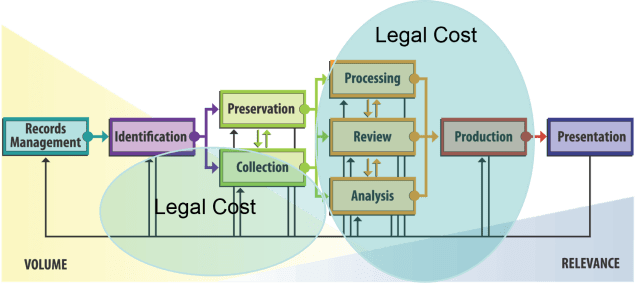
Usually when finding out where the costs are in any workflow, you will also identify the bottlenecks or constraints to the work process.  Eli Goldratt with his Theory of Constraints asserts that in any give work process there are only 2-3 bottlenecks or constraints.  He recommends that the automation work focus on the bottlenecks.
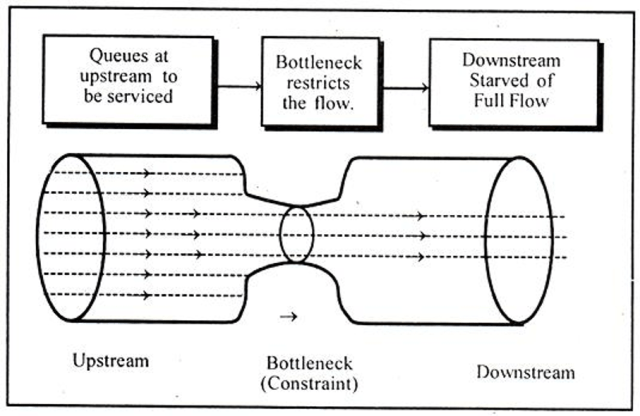
Now that you have gone through the orientation steps of the Macro OODA model for software, it is time to build a prototype solution to test your understanding of what you have observed and oriented.
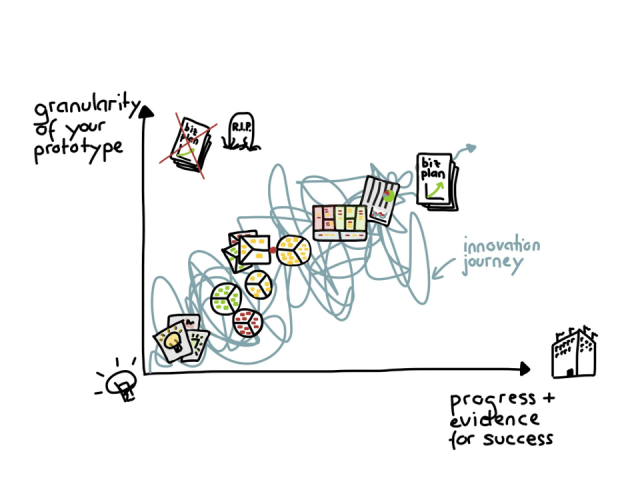
These prototypes can be as simple as a paper prototype as described in Vijay Kumar’s 101 Design Methods or as complicated as a software prototype.  Fortunately, our tools for building software prototypes have gotten so good that even complicated prototypes can be produced quickly.  Each week that goes by show cases another low code or no code tool for building sophisticated applications.

The Lean Canvas is a paper prototype of a business.

With the first pass of the Orientation loop producing a prototype, it is time to test the prototype with a real user in order to DECIDE what to do next.  The Macro DECISION Agile OODA loop is:
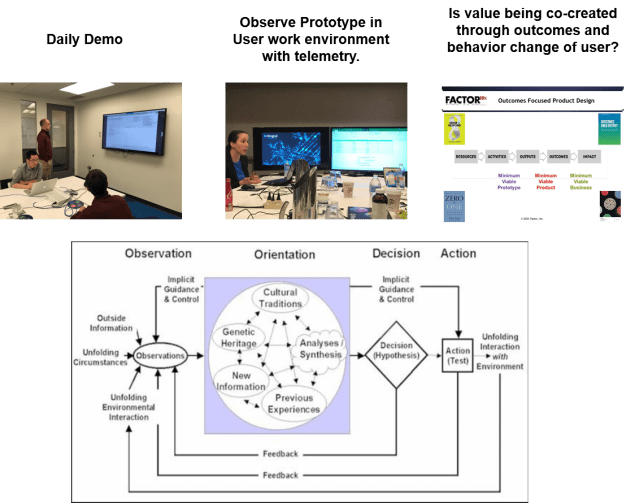
There are four possible actions that you need to decide on to move forward:

    1. Go on to the next step
    2. Recycle within this step
    3. Pivot (take another approach)
    4. Abandon the project

When moving in fast time, the most likely decision is that you need to recycle within this step.  If you have done good work in the Observe and Orient steps, the step 4 of abandoning is unlikely.   If you have recycled several times and don’t seem to be making progress, it is often advisable to go back to the Observe and Orient steps to see if you missed something.
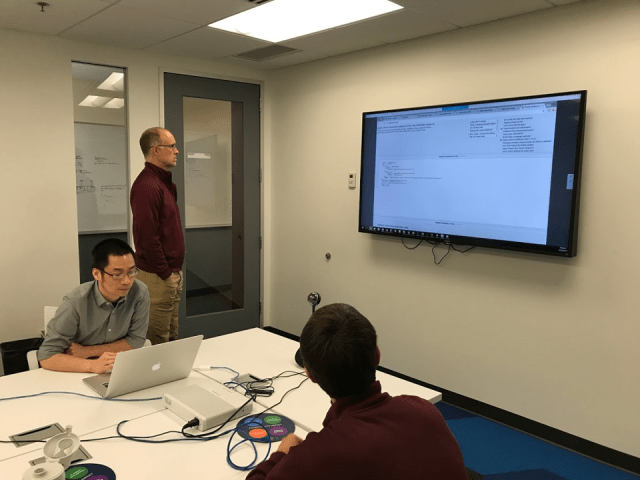
The first step within DECIDE is to commit to doing daily demos rather than agile daily stand up meetings.  The purpose of the daily demo is to SEE the actual progress being made.  It is a combination of understanding what was accomplished the previous day and designing the work for the next day.  The meeting should be rapid fire and last for just 15 minutes.  Once or twice a week, enough problems with the daily design may become evident and a longer stand-up meeting is scheduled to explore in more detail the execution problems with the prototype.  These longer meetings typically use the micro OODA process to go back to basics.

The participants in the daily demo should include the appropriate developers (usually a front end UI developer and a back end data manipulation and storage developer), a senior architect, a product owner or product manager, and a business owner.  An ideal room for a Daily Demo should include a large screen that can be seen by all and a white board for design discussions.  The meetings should be recorded and an audio transcript is generated.  Photos of the white board are also taken and included in the records of the meeting.  The meeting artifacts become the fodder for the weekly and monthly retrospective analysis.

The second step of the DECIDE step is to do a limited release to target users and have them use the prototype in an actual work environment.  The software should be instrumented so that actions the users take can be analyzed.  Video ethnography techniques to record what happens around the software usage are important to capture as well.  The product owner and UX representative check for additional insights through analysis of the telemetry and the video ethnography that are brought to the next day’s daily demo.

A key part of the DECIDE step is evaluating the prototype against the Outcomes and Impact that the product will have for the customer’s business.  An Outcomes focused product development effort is described in a “Product Produces Outcomes.”  As part of the Observe and Orient steps the product team develops a North Start Metric to guide the development.  The North Star Metric should be closely related to the desired outcomes for the product.
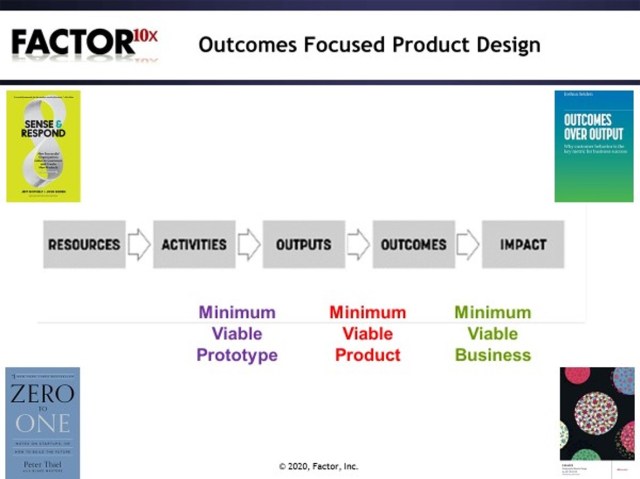
After DECIDING what to do next, it is time to ACT and launch a version of your product to a larger customer audience.  The Act Macro OODA loop is:
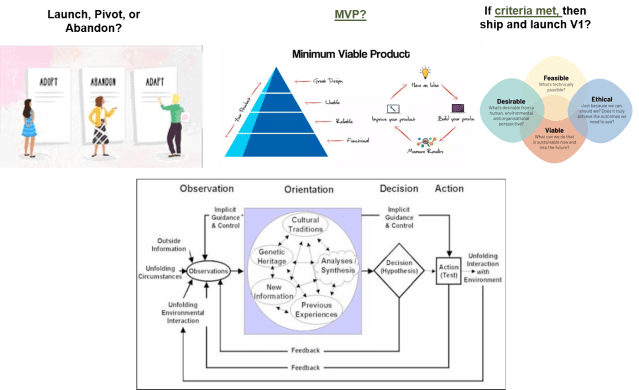
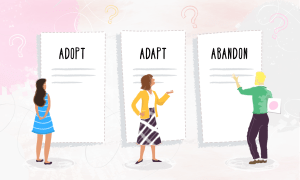
Now it is time to take ACTION.  As mentioned above, there are relatively few types of decisions to make during the DECIDE step.  “How to decide whether to adopt, adapt or abandon” describes a process for acting on the decisions.
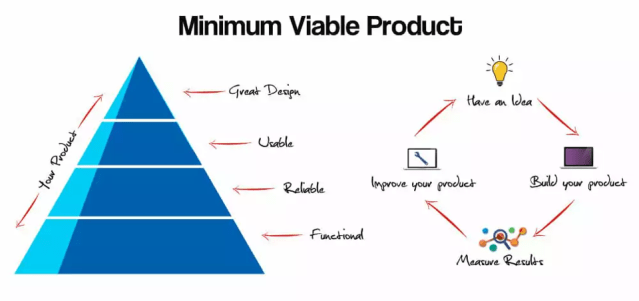
As you progress the first time through the cycle, you are deciding whether it is time to launch an Minimum Viable Product to gather information from a larger sample size of users.
Through telemetry data you quickly identify who is using the product on a regular basis and these users are good candidates to perform more in depth observation.  Opening up your product to a larger audience, particularly in cloud SaaS (software as a service) environment, helps you capture key metrics for product success:

    • How many users invited to participate actually sign up and log in?
    • How regularly do the participants log into the product (ideally multiple times per day)?
    • How much do the participants use the product?

The answers from your telemetry data and your qualitative research should help you answer the key criteria for getting ready to launch your V1 product and your business.  The launch criteria are;
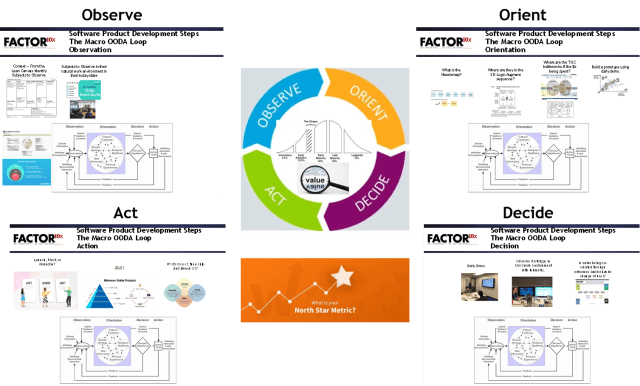
Bringing all the pieces of the macro agile OODA loop together, we have:
The first pass through the macro agile OODA loop gets us to a V1 of a product that becomes the test for a product solution fit as described by Ash Maurya at Leanstack.  The meta agile OODA loop cycles through the macro OODA process as the product evolves from V1 to Vn and the product becomes more of a Whole Product as described by Geoffrey Moore and Philip Kotler.
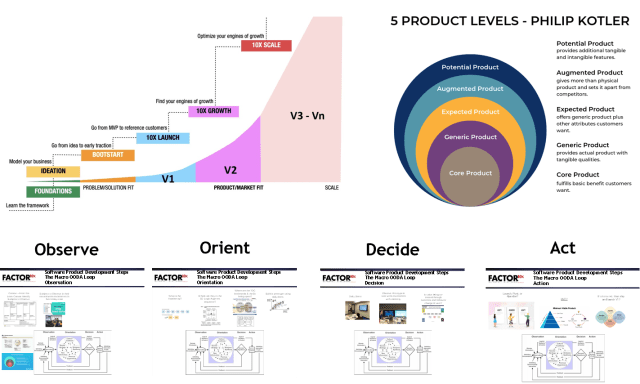
The Leanstack model identifies the key criteria that it takes to scale from an idea to a product solution fit to a product market fit to a product at scale.  Maurya’s books Running Lean and Scaling Lean describe the journey to scaling.  At Leanstack, Maurya provides tools and coaching services to aid early stage startup teams to navigate the journey to scaling.

For enterprise software products, there is another key element of software product design which Geoff Moore describes as the Whole Product concept to avoid the startup disaster of the chasm.  Moore identified that most startups don’t understand that the earliest customers are not representative of the Early Majority customers.
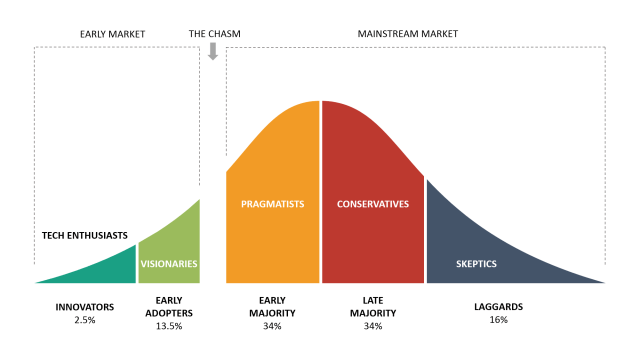
Moore in his books Crossing the Chasm and Zone to Win illustrates that the Whole Product concept is the method for avoiding the chasm and scaling.
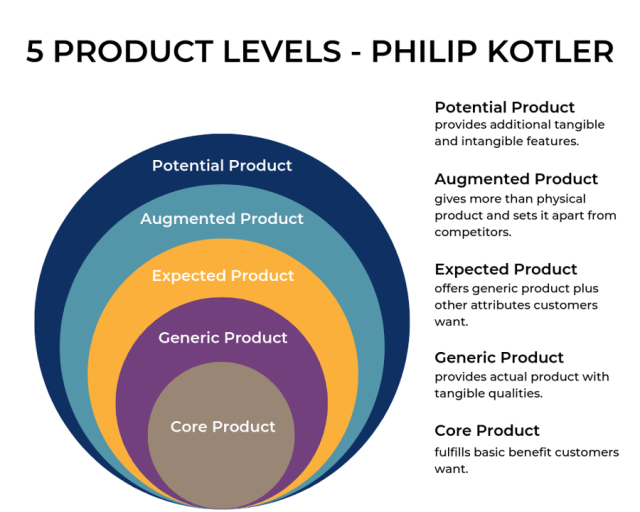
Most enterprise software product development teams only focus on the core and generic product layers.  Yet, in order for a customer to use a product to produce an outcome that will have a business impact the expected and augmented product layers are needed.  These two layers usually involve creating partnerships with other suppliers of related products.  From a technical perspective this means creating application programming interfaces (APIs) within your own product and using APIs from those products you are partnering with.

Throughout this whole process of Agile OODA HCD software product development, you are trying to co-create value for the customer.  The service science researchers have nicely formalized the value co-creation process represented by this diagram from Vargo and Lusch in “Service-dominant logic 2025.”
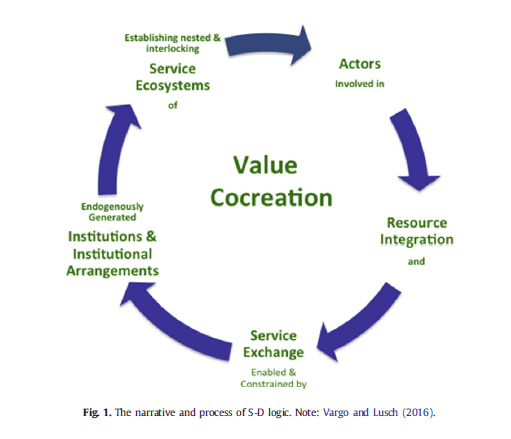
The diagram provides both a virtuous cycle of value co-creation and a narrative of how the pieces flow together:

“Actors involved in Resource Integration and Service Exchange enabled and constrained by endogenously generated Institutions and Institutional Arrangements  establishing nested and interlocking Service Ecosystems of Actors …”

That is certainly a mouthful of complex concepts from a pair of academic marketing professors.  What is means to me is that in order for any company that produces a product to receive value it must first help co-create value with its customers.

The diagram below summarizes the keys to “Observe, Don’t Ask” in order to reduce the uncertainty of software product development by using the Agile OODA Loop at a micro, macro and meta level in order to reliably and quickly generate successful products.
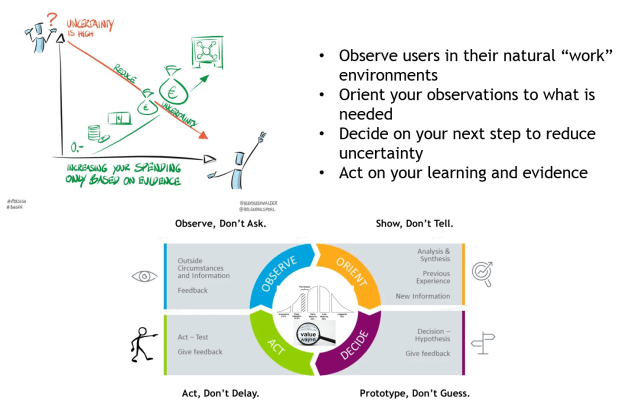
Observe, Don’t Ask.  Show, Don’t Tell.  Prototype, Don’t Guess.  Act, Don’t Delay.

    • Part 1   Observe, Don’t Ask.  Show, Don’t Tell
    • Part 2   Where does “Observe, Don’t Ask” show up in software product development?
    • Part 3   The OODA Loop
    • Part 4   Orient, Evaluate and Prototype
    • Part 5   Video Highlights for Show, Don’t Tell
    • Part 6:  Show the software, don’t try to describe it

Posted in Content with Context, Design, Learning, Patterns, Product, User Experience, Wake Up! | Leave a comment